
Download TikTok MP3
TikTok Downloader, Download Video TikTok Without Watermark (TikTok MP3 & MP4)
How to Download TikTok MP3
Download TikTok MP3 online with MP3TikTok and turn supported TikTok videos into convenient MP3 audio files. Whether you want music, sounds, podcasts, voice clips, or other audio, our MP3 TikTok downloader works directly in your browser. No app installation or registration is required.
Simply copy the TikTok video link, paste it into MP3TikTok, and choose the available MP3 option. Moreover, the service is designed for quick processing and easy downloads across phones, tablets, and computers.
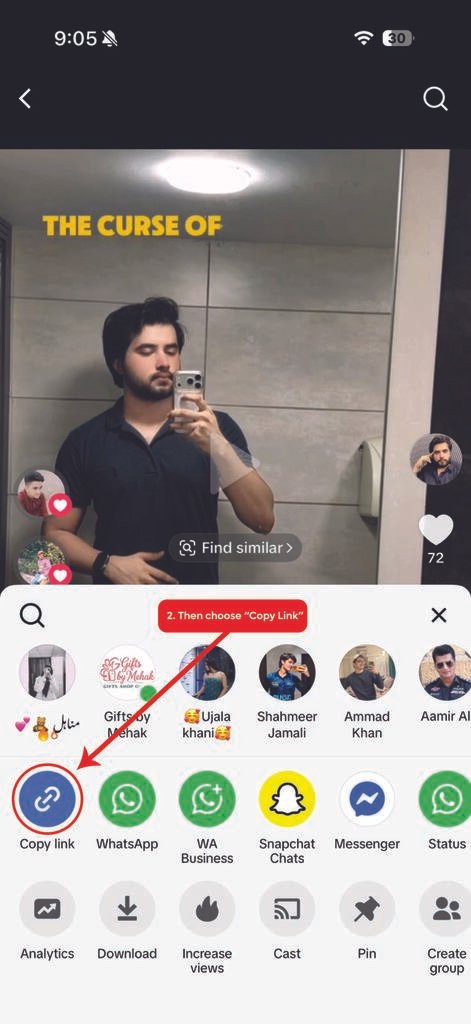
Copy the TikTok Video Link
Open TikTok and find the video with your preferred sound. Tap Share and select Copy Link. On desktop, you can copy the video URL directly from your browser.
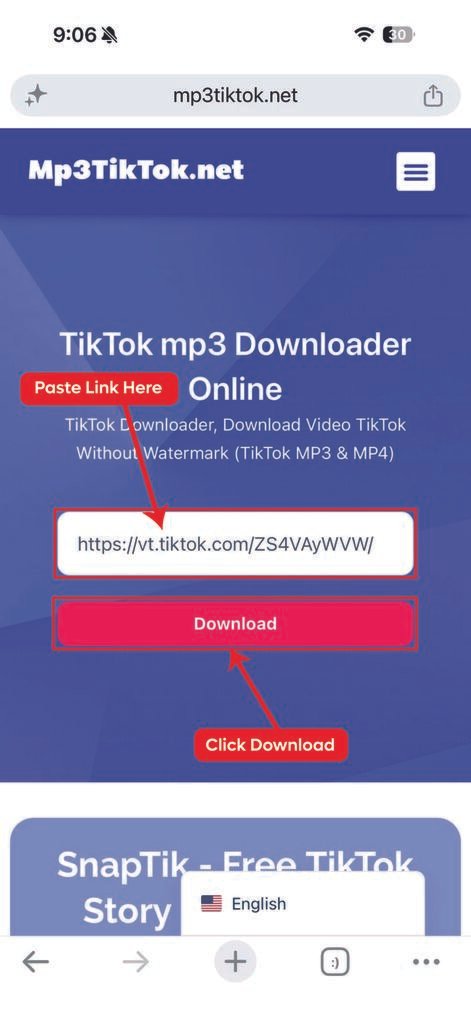
Paste the Link
Now open the TikTok Video Downloader page and paste the copied URL into the input field. After that, let the downloader process the link and display the available options.
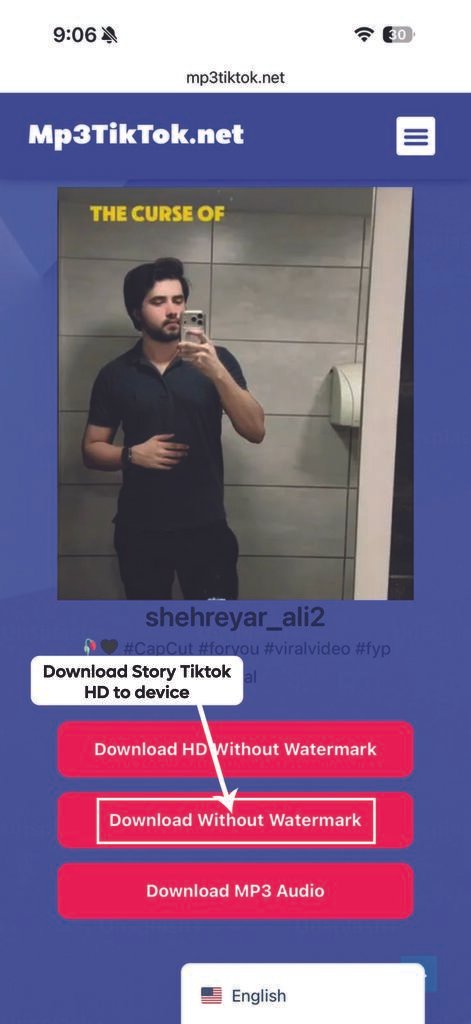
Download the MP3 Audio
Select the available MP3 option to start the conversion. Once processing finishes, save the audio file to your device. The final download time can vary based on the video source and internet connection.
TikTok MP3 Downloader Features
Easy Online Audio Conversion
MP3TikTok lets you extract available audio from supported TikTok videos without installing additional software. As a result, you can access your audio files directly through a modern web browser.
MP3 Audio Format
The service provides MP3 downloads when the format is available. Therefore, you can listen to saved audio using phones, computers, tablets, and many standard media players.
Fast Processing
Nobody wants to wait around for a simple audio download. For this reason, MP3TikTok keeps the process straightforward, helping you move from a copied link to an available download with minimal steps.
Works on Different Devices
You can use the TikTok MP3 downloader on Android, iPhone, iPad, Windows, Mac, and other compatible devices. In addition, the browser-based design means you don't need a specific operating system.
No App or Registration
There is no need to create an account before using the service. Instead, open MP3TikTok in your browser, paste the TikTok URL, and select an available download option.
Simple and Convenient
The entire process follows three basic actions: copy, paste, and download. Consequently, even new users can quickly understand how to save supported TikTok audio.
More TikTok Download Tools
TikTok contains more than music and video content. For example, if you want to save a video, use our TikTok Video Downloader. It supports supported TikTok video downloads through a simple browser-based process.
Similarly, you can use our TikTok Story Downloader for supported Stories or visit the TikTok Slideshow Downloader for photo and slideshow content.
Why Download TikTok Audio as MP3?
MP3 files are convenient when you only need the audio instead of the complete video. For instance, you can save a useful spoken clip for offline listening or keep a favorite sound in an audio-friendly format.
However, downloaded content should be used responsibly. Respect the creator’s copyright and permissions before reposting, distributing, or using audio commercially.
Frequently Asked Questions
How can I download TikTok MP3 audio?
Copy the TikTok video link and paste it into MP3TikTok. Then, choose the available MP3 option to save the audio.
Is MP3TikTok free to use?
MP3TikTok provides its supported downloading features without requiring a paid subscription. Additionally, no account is required to start the process.
Can I download TikTok MP3 without an app?
Yes. The service works through your web browser. Therefore, you can convert supported TikTok videos to MP3 without installing a separate application.
Does MP3TikTok work on iPhone?
Yes. You can access the MP3 TikTok downloader through a compatible browser on iPhone and iPad. Likewise, Android and desktop devices can access the service.
Why is my TikTok MP3 download not working?
The link may be invalid, unavailable, private, or unsupported. First, check the copied TikTok URL and try again with a publicly accessible video.
Can I download any TikTok sound?
The available result depends on the TikTok URL and source content. Therefore, some videos may provide an MP3 option while others may not.
Does MP3TikTok store my downloaded audio?
The downloader doesn’t require you to create an account or submit unnecessary personal information. However, users should review the site’s current privacy information for the latest details.
Download TikTok MP3 Online
Ready to save supported TikTok audio? Simply copy the video URL, paste it into MP3TikTok, and select the available MP3 option. The straightforward process makes TikTok MP3 downloads convenient across compatible devices.
Finally, remember to respect copyright and creator rights when downloading or sharing content.
Note: MP3TikTok is an independent TikTok Video Downloader and is not affiliated with TikTok or ByteDance Ltd. Our tool is designed to help users download publicly available TikTok videos and audio for personal use. Please respect copyright laws and the rights of content creators when downloading or sharing any content. If you’re looking for a fast, free, and reliable way to save TikTok videos without a watermark, MP3TikTok offers a simple solution with HD quality, MP4 and MP3 support, unlimited downloads, and compatibility across all major devices and browsers.
 English
  Español
  Bahasa Indonesia
  Français
  Deutsch
  Italiano
  ไทย
ไทย  Bahasa Melayu
  Português
  Türkçe
  Tiếng Việt