
SnapTik TikTok – Download TikTok Slideshows
TikTok Downloader, Download Video TikTok Without Watermark (TikTok MP3 & MP4)
Download TikTok Slideshows Without Watermark
SnapTik TikTok searches are often related to saving TikTok photo posts and slideshows. MP3TikTok provides a simple online TikTok slideshow downloader that lets you save supported TikTok slideshow content directly from your browser.
To get started, copy the link of the TikTok photo post you want to save. Then, paste the URL into our TikTok slide downloader and choose an available download option. No extra software or browser extension is required.
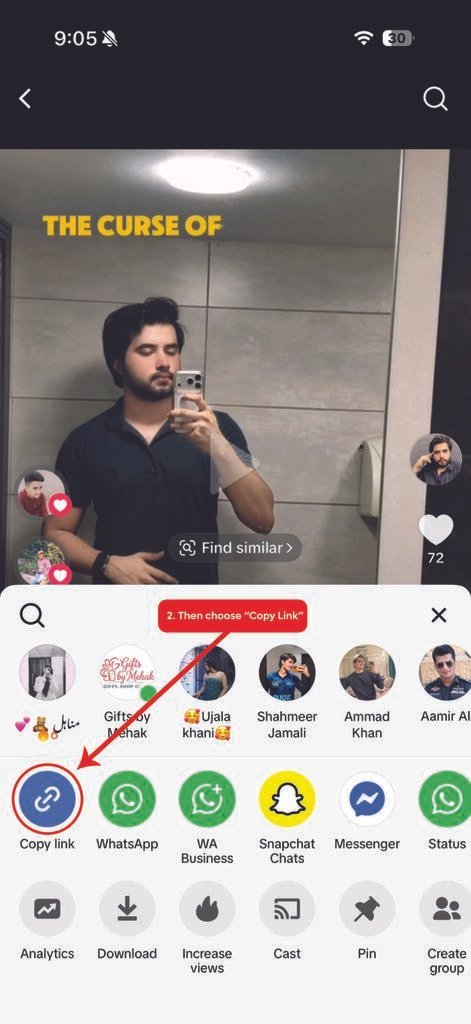
Copy the TikTok Slideshow Link
First, open TikTok and find the photo slideshow you want to save. Tap the Share button and select Copy Link. On a computer, you can copy the post URL directly from your browser.
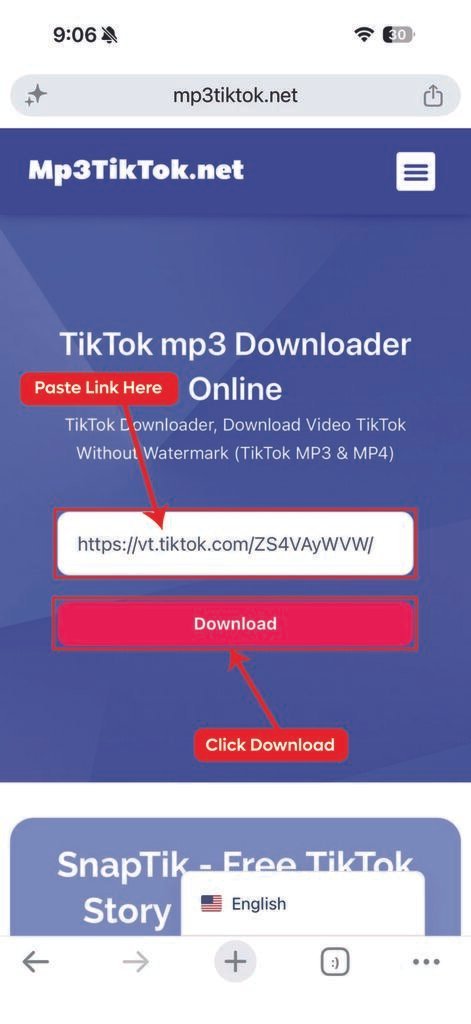
Paste the Link
Next, open MP3TikTok in your preferred browser. Paste the copied TikTok link into the downloader field. Make sure the URL points to the slideshow or photo post you want to download.
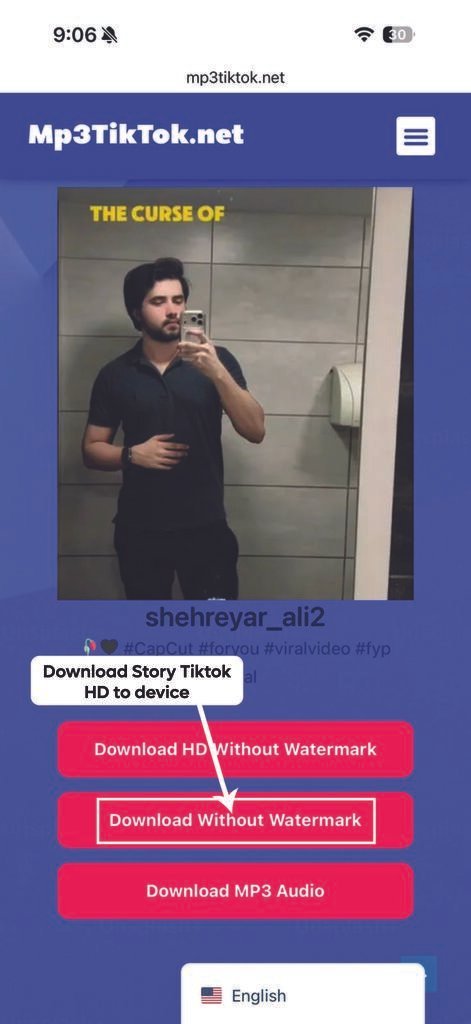
Download TikTok Slides
Finally, click the download button and wait while the TikTok slideshow downloader processes the link. If the content is supported, available photos or slideshow files will appear for saving.
As a result, you can keep your favorite TikTok slides for personal offline viewing.
Benefits of Our TikTok Slide Downloader
Save TikTok Photos
Our TikTok photo downloader makes it easier to save supported images from TikTok photo posts. You can access the tool directly through a web browser.
No Watermark Option
When a watermark-free version is available, you can save supported TikTok slides without the visible watermark. This provides a cleaner file for personal use.
High-Quality Images
MP3TikTok aims to provide the best available quality from the source. Therefore, the final image resolution can depend on the original TikTok post.
Works on All Devices
The service works across Android phones, iPhones, tablets, Windows computers, and Mac devices. Simply use a modern browser and an available TikTok post link.
No App Required
You do not need to install an application or browser extension. Instead, open MP3TikTok, paste your link, and use the available download option.
Free and Easy to Use
The TikTok slide downloader is designed for quick and simple use. There is no complicated setup, so beginners can follow the process with ease.
Frequently Asked Questions
What is a TikTok slideshow downloader?
A TikTok slideshow downloader is an online tool for saving supported photos or slideshow posts from TikTok. MP3TikTok processes the copied post link through your browser.
How do I download TikTok slides?
First, copy the link of the TikTok slideshow. Then, paste it into MP3TikTok and select an available download option.
Can I download TikTok photos without a watermark?
If a watermark-free version is available, MP3TikTok may provide an option to save the supported image without the visible watermark. Availability can depend on the source content.
Can I use the downloader on Android?
Yes. Android users can open MP3TikTok in a supported browser, paste the TikTok URL, and choose an available download option.
Do I need to install an app?
No. The downloader works through your web browser. Therefore, you do not need a separate application or browser extension.
Download Other TikTok Content
TikTok contains more than photo slideshows. Therefore, MP3TikTok provides tools for different types of content.
If you want to save TikTok videos, visit our TikTok Video Downloader.
For TikTok audio, you can use our TikTok MP3 Downloader.
You can also save supported Stories with our TikTok Story Downloader.
Note: MP3TikTok is an independent TikTok Video Downloader and is not affiliated with TikTok or ByteDance Ltd. Our tool is designed to help users download publicly available TikTok videos and audio for personal use. Please respect copyright laws and the rights of content creators when downloading or sharing any content. If you’re looking for a fast, free, and reliable way to save TikTok videos without a watermark, MP3TikTok offers a simple solution with HD quality, MP4 and MP3 support, unlimited downloads, and compatibility across all major devices and browsers.
 English
  Español
  Bahasa Indonesia
  Français
  Deutsch
  Italiano
  ไทย
ไทย  Bahasa Melayu
  Português
  Türkçe
  Tiếng Việt